
User Interface
Settings
Overview
The Settings page is the launch pad for accessing all your settings. Access the settings page by clicking the Cog icon in the left hand toolbar or the Settings menu item in the left hand navigation menu. You can also navigate to the settings page directly using this link https://my.clippings.io/settings .
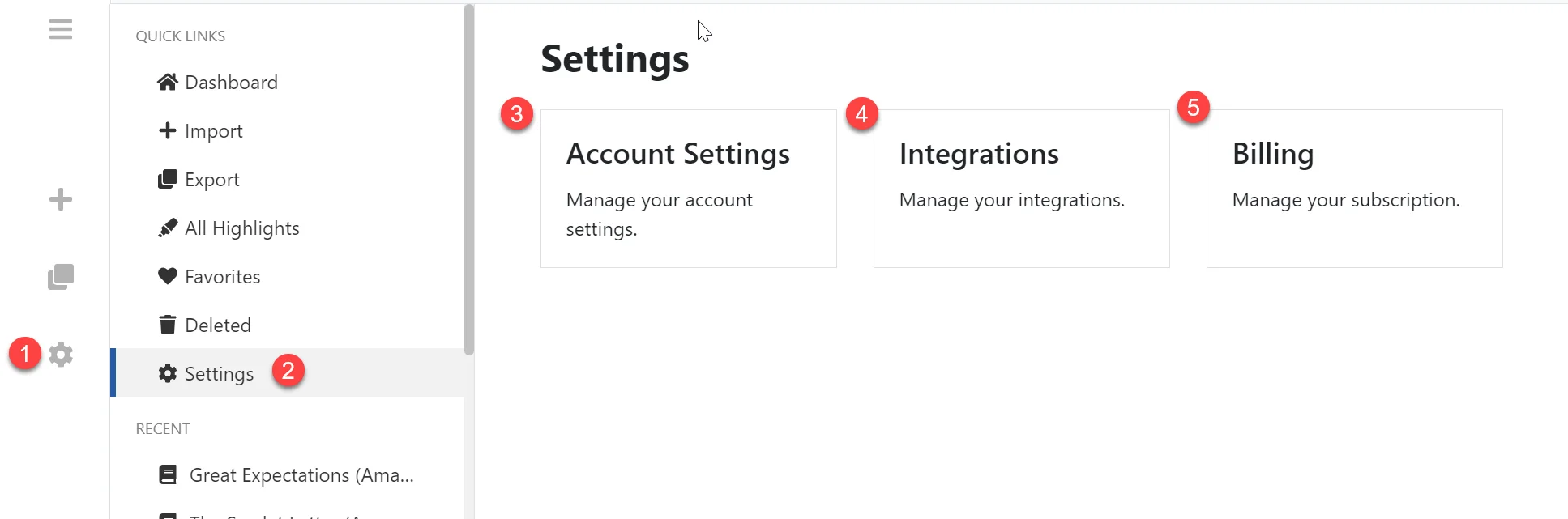
- Click the Cog icon in the left toolbar to the Settings page.
- Or click the Settings menu item in the left hand navigation menu.
- Click the Account Settings option to go to the Account Settings page. For more information on account settings see the Account Management section.
- Click the Integrations option to go to the Integrations Settings page. For more information on integration settings see the Integration Settings Guide.
- Click the Billing to go to the Billing page. For more information on billing see the Account Management section.
Explorer
The Explorer Page is where you view, edit and manage your Kindle Highlights. See below for a quick overview and read the Using The Explorer section for…
Navigating your Kindle Highlights
Quickly navigate your Kindle Highlights using the left hand navigation menu. The menu can be collapsed and expanded using the three bar icon directly…