
Resetting your Exported Highlights
Clippings.io efficiently exports your Kindle Highlights to integrations by keeping track of which Highlights have been exported previously and only exporting new Highlights. This dramatically speeds up the export process.
There might be occasions when you want to export everything again, for example, if you have changed how you would like your Kindle highlights formatted.
You can reset your exported highlights on the Integrations Settings page.
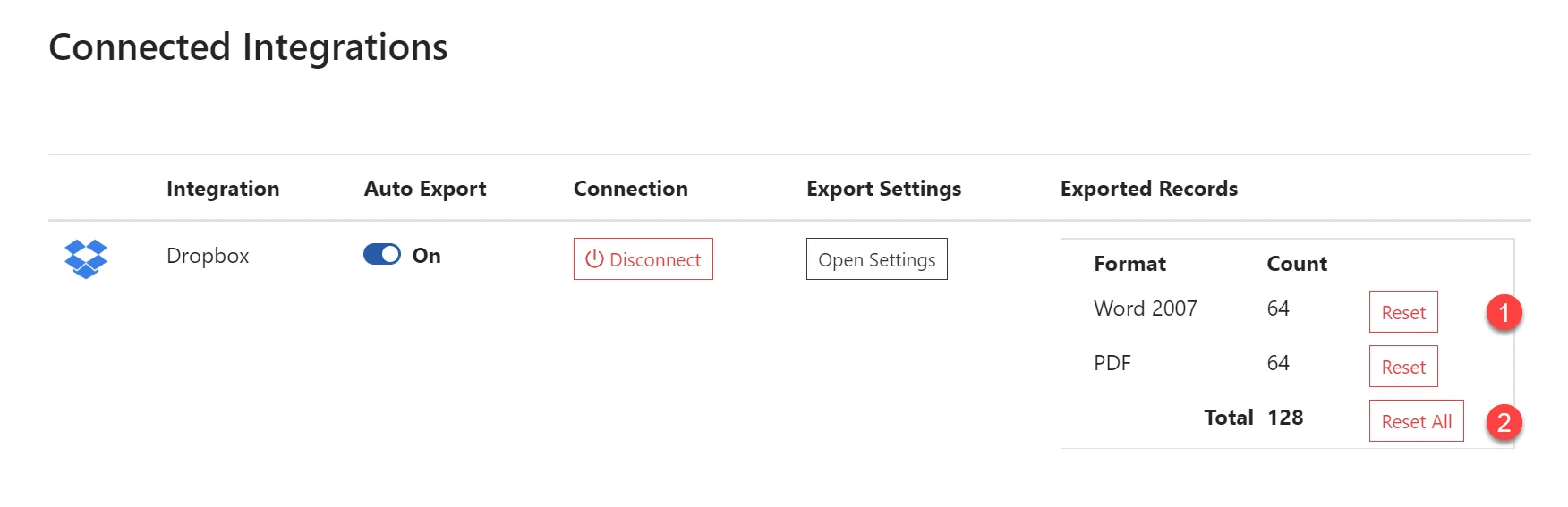
If you want to export everything again you can use the Reset All button in the exported records section. When you click the Reset All button, it removes the exported flag for all the Kindle Highlights for that integration. Clicking the Reset button, it removes the exported flag for all the Kindle Highlights for that file format.
Resetting your exported records does not delete the documents in the Integration. These documents will be overwritten the next time you perform an export.
Supported Integrations and Download Formats
Please see our list of supported integrations and download file formats. If you would like an additional integration or file format added please…
Export Overwriting Considerations
When exporting your Kindle highlights to an integration the documents in the integration will be overwritten. If a book has a new highlight, then the…